学习与分享您的当前位置:首页 > 新闻资讯 > 学习与分享
心电图转速表的生成
来源:北京京显数字技术有限公司 │ 发表时间:2020-06-09 | 浏览数:载入中...
1. 输入所需安装包
[1]: # biosignalsnotebooks own package for loading and plotting the acquired data
import biosignalsnotebooks as bsnb
import matplotlib.pyplot as plt
# Scientific packages
import numpy
2. 加载获取的ECG数据G
[2]: data, header = bsnb.load("C:/Users/Administrator/Desktop/File/opensignals/ECG.
c→h5", get_header=True);
[3]: # Data is in dictionary format and channel is one of the keys. This line gets␣
c→the first key of the dictionary.
channel = list(data.keys())[0]
# The mac address of the acquiring device corresponds to the device name of the␣ c→dictionary returned in the header, that was previously stored in a variable. mac_address = str(header["device name"])
[4]: print(channel,mac_address)
CH1 00:07:80:46:F0:33
3. 在变量内存储采样频率和获取的数据
[5]: # Sampling frequency of acquired data
fs = header["sampling rate"]
# Signal Samples
signal = data[channel]
# Generate the time axis of the signal given its sampling frequency
time = bsnb.generate_time(signal, fs)
4. 检测R峰值所在的时刻
[6]: # R peak detection.
time_r_peaks, amp_r_peaks = bsnb.detect_r_peaks(signal, fs, time_units=True)
5. 确定连续R个峰之间的时间(心脏周期)
[7]: tachogram = numpy.diff(time_r_peaks)
# The tachogram time can be obtained by shifting each point of heartbeat␣
c→duration to the center of the two corresponding peaks.
tachogram_time = (time_r_peaks[1:] + time_r_peaks[:-1]) / 2
[8]: tachogram_data, tachogram_time = bsnb.tachogram(signal, fs, signal=True,␣
c→out_seconds=True)
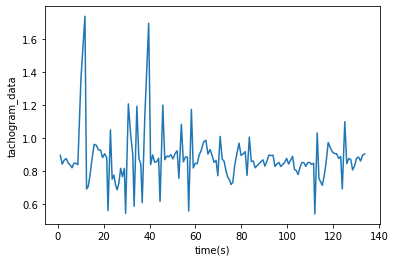
[11]: plt.plot(tachogram_time,tachogram_data) plt.xlabel("time(s)") plt.ylabel("tachogram_data")
[11]: Text(0, 0.5, 'tachogram_data')






 产品展示
产品展示
 http://bitbrain.cn/Zz_www.eastsummit.net/index.html
 销售一部
销售一部